
Budgeting tool makes planning and tracking the finances of paid events easier – before, during and after your event. With Eventilla’s budgeting tool, you can build your event budget, compare planned and actual sales and expenses, and see the full financial picture in one clear view. In practice, it works as an event organizer’s budget calculator, updating in real time as ticket sales progress.
Good news for paid event organizers!
We developed a new tool in Eventilla that makes managing the budget of paid events effortless. The new budgeting tool allows you to create your event budget and compare planned figures with actual sales and expenses. You can monitor sales development even before the event takes place. Does a specific training or event need more marketing effort? Especially organizations arranging multiple paid trainings have fallen in love with this feature during testing.
What does the budgeting tool do in practice?
The budgeting tool can be found in Eventilla within the event editing view. You can create as many ticket types as needed for a paid event, meaning different registration types. For example, early buyers may receive discounted “Early Bird” tickets, VIP customers can purchase additional services at special prices, or live and online participation can be priced differently. Once prices are defined for each ticket type, you can move to the budgeting tool to record your expected sales.
- Create your event budget in advance
- Add expected sales and costs
- Record actual sales and expenses
- Review planned vs. actual event budget
- Develop your events long term
- Manage the entire payment process
Create your event budget in advance
Expected sales consist of ticket sales and other anticipated revenue. For expected ticket sales, you simply enter the number of tickets you expect to sell for each ticket type. Ticket prices are automatically imported into the tool.
Psst. Do you offer ticket discounts? Discount codes created in Eventilla and the related reductions are automatically visible in the event budget summary — no need to calculate them separately!
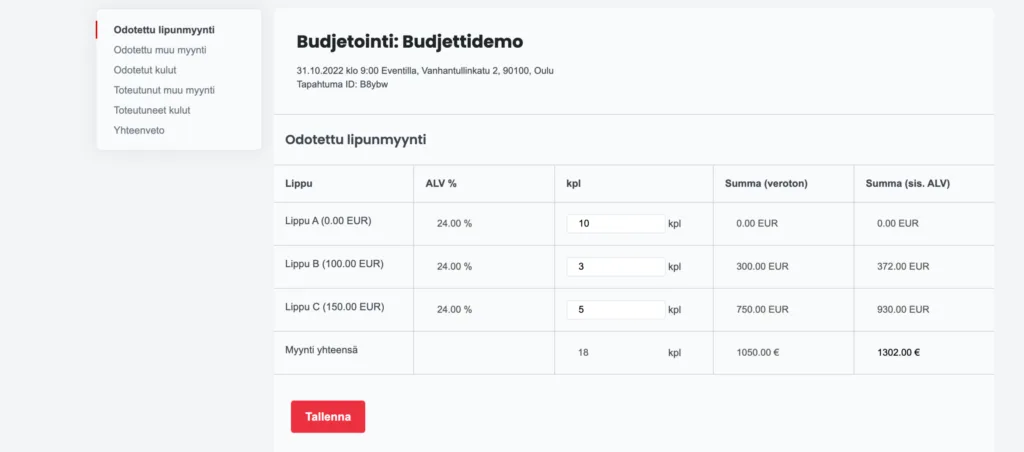
Add expected sales and costs
Other expected revenue may include merchandise sales, additional services or sponsorship income. These are recorded separately in the budget as fixed amounts.
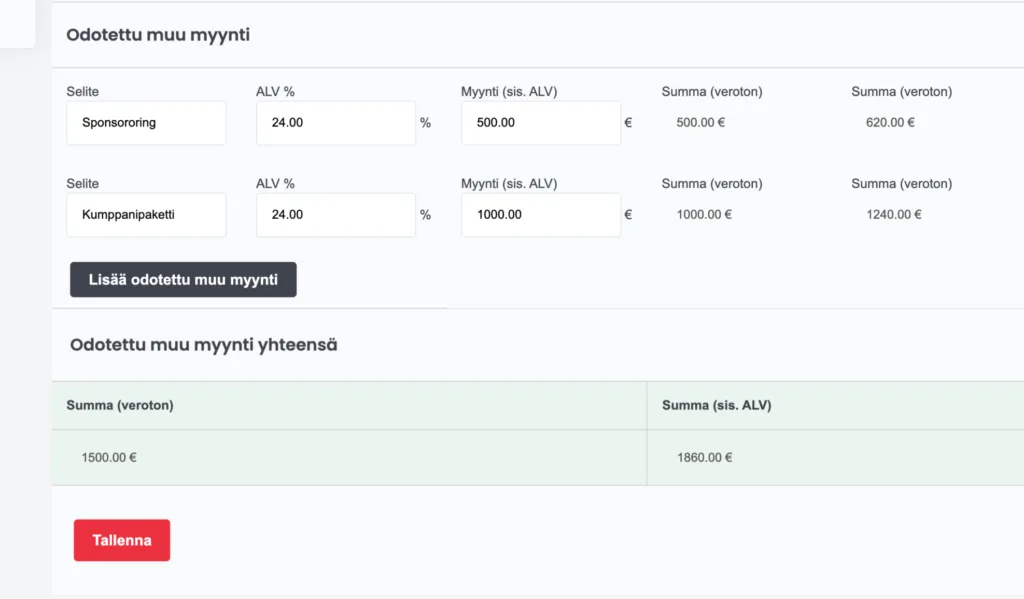
After expected revenue, your event budget needs expected costs. These can be added either per participant or as fixed costs. For example, venue rent is a fixed cost, while catering expenses may be calculated per attendee. Participant-based costs increase automatically in real time as registrations grow.
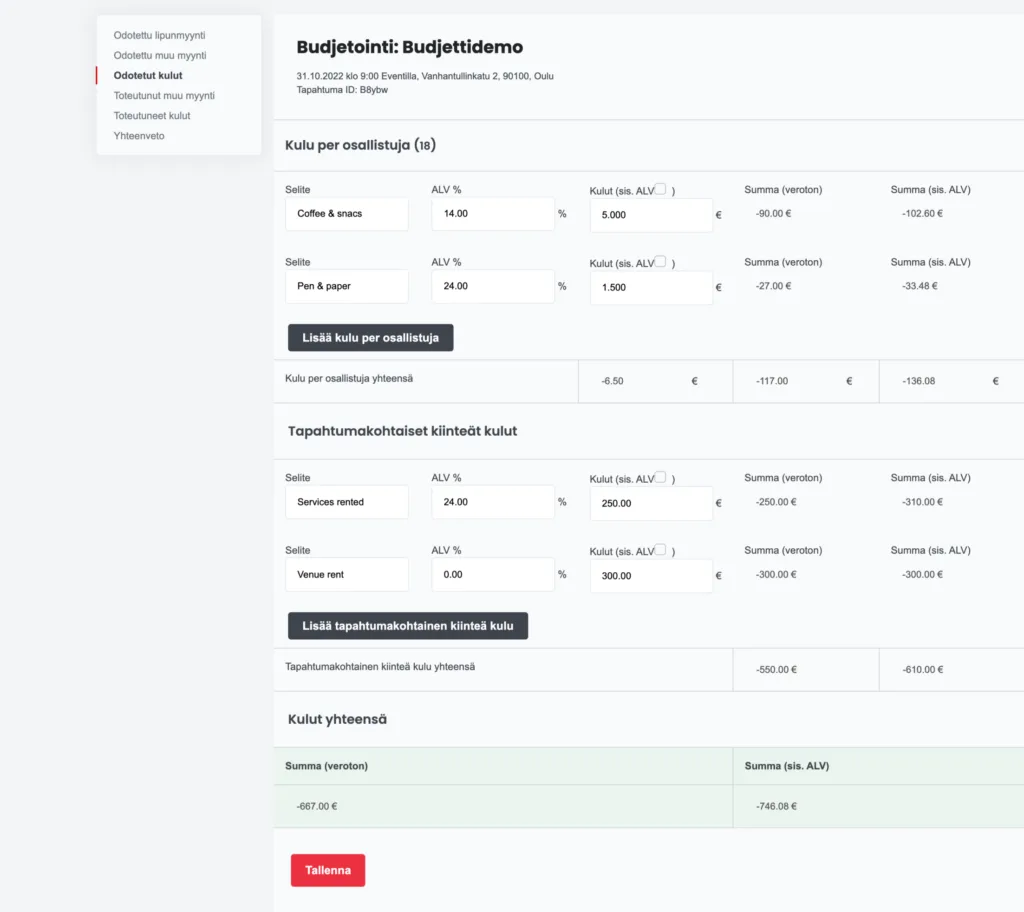
Record actual sales and expenses
After the event, it’s time to compare your planned budget with actual results. Revenue from ticket sales updates automatically in the event budget summary, so manual entry is not required. Other realized revenue must be confirmed manually. The budgeting tool suggests the expected revenue as the actual amount, making updates easy. Actual costs can be adjusted in the expenses tab if needed.
Review planned vs. actual event budget
The summary view displays both planned and actual budgets side by side. This makes it easy to compare figures in one table. The budgeting tool automatically calculates contribution margin per participant and the overall profit percentage of the event.
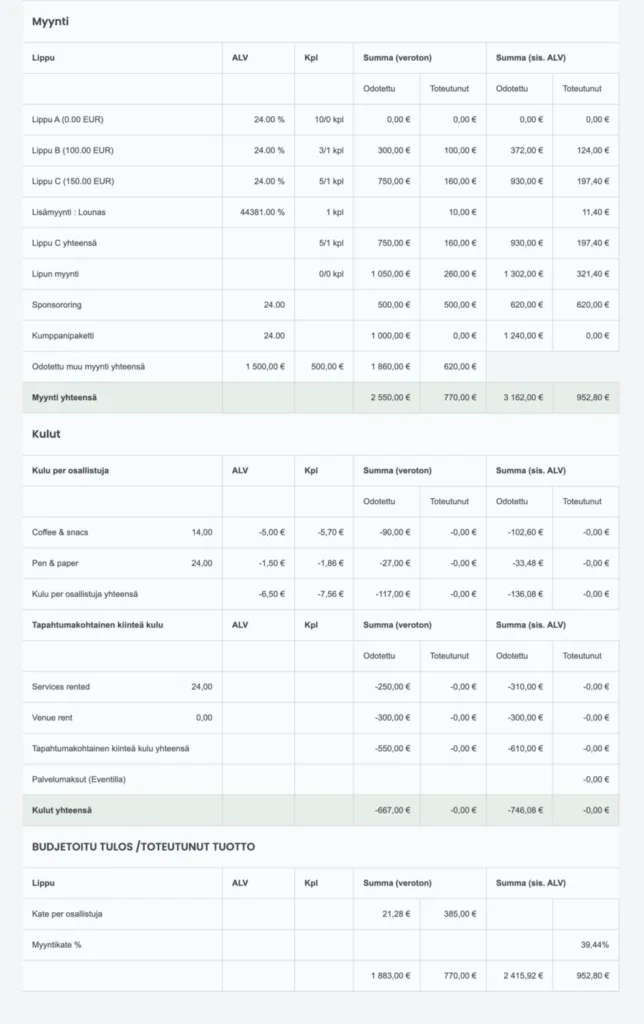
Develop your events long term
The summary view makes financial analysis straightforward. When your entire event financial structure is clearly displayed, you can quickly identify areas for improvement. Tracking payment flows over time with Eventilla’s budgeting tool enables continuous development and smarter decision-making.
Manage the entire payment process with Eventilla
In addition to a carefully planned event budget, it’s important to ensure smooth payment processing. Eventilla offers an integrated online payment module that enables online banking, credit card and mobile payments. Alternatively, payments can be invoiced or collected via your own integrated payment provider.

Ready to make event budget management effortless?
Frequently asked questions:
- Is the budgeting tool also a budget calculator? Yes. The budgeting tool functions as a budget calculator by combining planned revenue and expenses with real-time actual data in one summary view.
- Does ticket revenue update automatically? Yes. Ticket sales revenue updates automatically in the budget summary.
- Can I add both fixed and participant-based costs? Yes. For example, venue rent can be added as a fixed cost, while catering costs can be calculated per participant.
- How does the budgeting tool help before the event? It allows you to monitor sales development and react quickly if certain ticket types need additional marketing efforts.
About the author
Kirjoittajasta